设置 Okta 单点登录
OpenID Connect(OIDC)在 OAuth 2.0 之上增加了身份层,使应用程序能够验证最终用户的身份,并从身份提供商(IdP)获取基本资料信息。在单点登录(SSO)部署中,用户通过 IdP 完成身份认证后,无需分别登录每个关联的应用程序即可访问它们。
Okta 是一个基于云的身份与访问管理平台,可作为集中式 IdP。它负责管理用户、应用程序分配以及身份认证和访问策略。在本集成中,Apache APISIX 会先将浏览器身份认证委托给 Okta,再把请求代理到上游服务。
本指南介绍如何配置 APISIX 和 Okta,以使用带有用于代码交换的证明密钥(PKCE)的 OIDC 授权码流程。当请求没有有效的 APISIX 会话时,APISIX 会将浏览器重定向到 Okta。身份认证成功后,APISIX 会使用授权码换取 Token、创建浏览器会话,并继续处理原始请求。
前置条件
- 安装 Docker。
- 安装 cURL 和 OpenSSL。
- 按照入门教程,使用 Docker 启动 APISIX。
- 拥有 Okta 组织的管理员权限。
- 如果计划使用 ADC,请先安装并配置 ADC。
- 如果使用 Admin API 示例且启用了身份验证,请将管理员角色的密钥导出为
ADMIN_API_KEY。请在deployment.admin.admin_key下配置该密钥。Docker 快速入门为了便于本地评估而禁用了身份验证;生产环境中请保持启用。
配置 Okta
在 Okta 中创建 OIDC Web 应用程序,然后保存其域名和客户端凭证,以供 APISIX 路由使用。
创建应用集成
在管理控制台中,依次选择 Applications and Resources → Applications → Create App Integration。选择 OIDC - OpenID Connect 和 Web Application,然后选择 Next。
配置应用程序:
- 将应用集成名称设置为
APISIX Authorization Code。 - 保持选中 Authorization Code,并清除其他授权类型。
- 将默认的登录重定向 URI 替换为
http://localhost:9080/anything/user/callback。 - 在 Controlled access 下,为本地测试选择 Allow everyone in your organization to access。在生产环境中,仅向需要使用该应用程序的用户或用户组授予访问权限。
- 选择 Save。
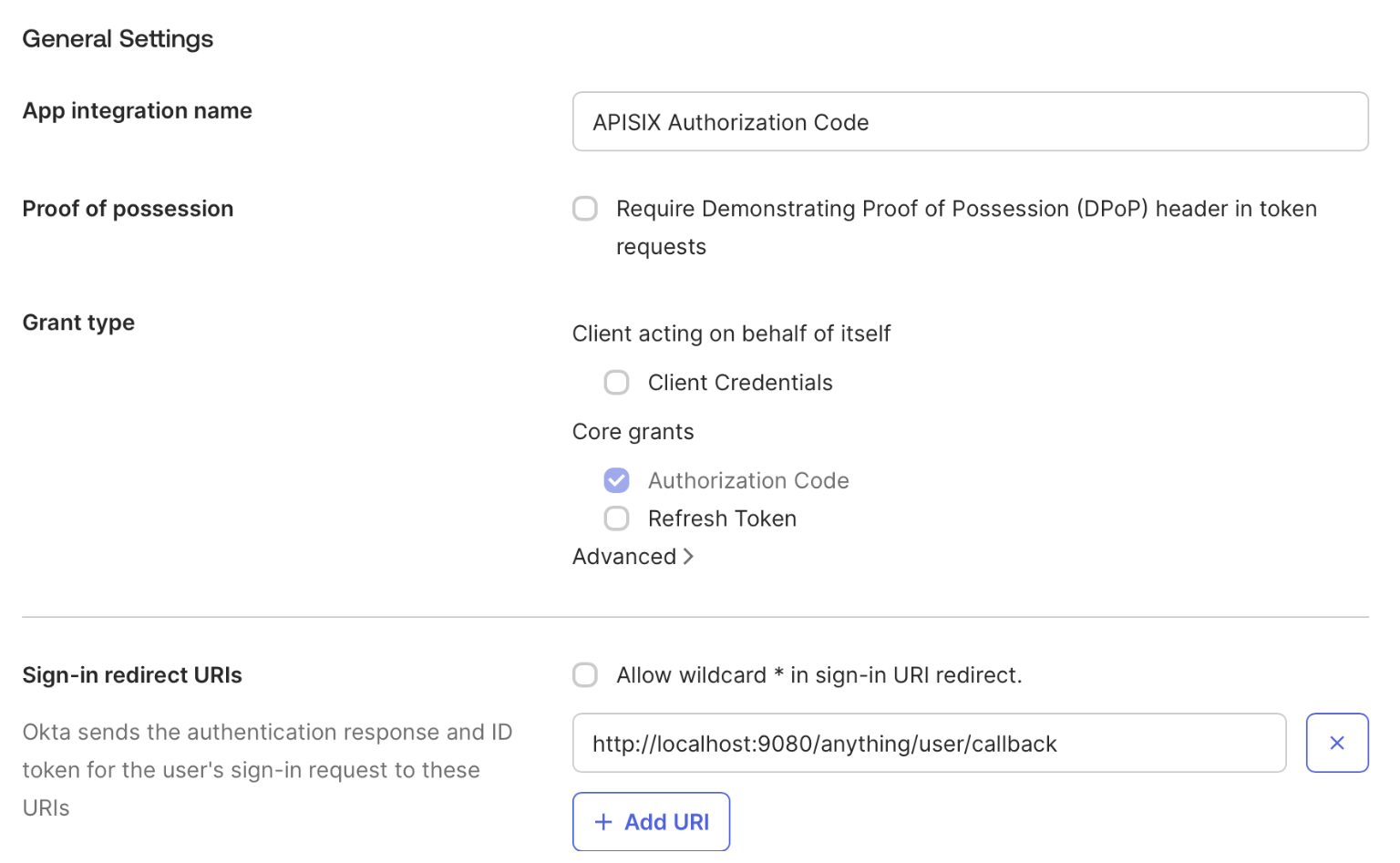
保存 OIDC 配置
Okta 管理控制台和 OIDC 端点使用不同的主机名。如果管理控制台 URL 为 https://example-admin.okta.com,则发现、授权和 Token 请求应使用 example.okta.com。
在应用程序的 General 标签页中找到客户端 ID 和客户端密钥。将 Okta 域名、发现 URL、客户端 ID 和客户端密钥保存到环境变量中,并替换示例值:
export OKTA_DOMAIN=example.okta.com
export OKTA_DISCOVERY="https://${OKTA_DOMAIN}/.well-known/openid-configuration"
export OKTA_CLIENT_ID=replace-with-your-client-id
export OKTA_CLIENT_SECRET=replace-with-your-client-secret
配置 APISIX
配置一条路由,先对浏览器请求进行身份认证,再将请求转发到公共 HTTP 请求与响应服务 httpbin.org。/anything/user/* 端点会返回请求详情,以便验证。
生成一个唯一密钥,供 APISIX 加密浏览器会话 Cookie 并验证其完整性:
export APISIX_SESSION_SECRET="$(openssl rand -hex 32)"
选择使用 Admin API 或 ADC 配置路由。
- Admin API
- ADC
创建一条使用 Okta 对浏览器请求进行身份认证的路由:
curl "http://127.0.0.1:9180/apisix/admin/routes/okta-browser" -X PUT \
  -H "X-API-KEY: ${ADMIN_API_KEY}" \
  --data-binary @- <<EOF
{
  "uri": "/anything/user/*",
  "plugins": {
    "openid-connect": {
      "client_id": "$OKTA_CLIENT_ID",
      "client_secret": "$OKTA_CLIENT_SECRET",
      "discovery": "$OKTA_DISCOVERY",
      "scope": "openid profile",
      "redirect_uri": "http://localhost:9080/anything/user/callback",
      "bearer_only": false,
      "use_pkce": true,
      "session": {
        "secret": "$APISIX_SESSION_SECRET"
      },
      "set_access_token_header": false,
      "set_id_token_header": false,
      "set_userinfo_header": false
    },
    "proxy-rewrite": {
      "headers": {
        "remove": ["Cookie"]
      }
    }
  },
  "upstream": {
    "type": "roundrobin",
    "nodes": {
      "httpbin.org:80": 1
    }
  }
}
EOF
❶ discovery:Okta 组织授权服务器的 OIDC 发现文档 URI。
❷ redirect_uri:身份认证后 Okta 将浏览器返回到的 URI。它必须与 Okta 中配置的登录重定向 URI 一致。
❸ bearer_only:设置为 false,以便在请求没有有效会话时由 APISIX 启动浏览器身份认证流程。
❹ use_pkce:设置为 true,在授权期间发送 S256 PKCE 质询。
❺ set_access_token_header、set_id_token_header 和 set_userinfo_header:设置为 false,防止 APISIX 将访问 Token、ID Token 和用户信息添加到上游请求头。
❻ proxy-rewrite.headers.remove:包含 Cookie,用于在代理请求前删除整个 Cookie 请求头,其中也包括 APISIX 会话 Cookie。如果上游应用程序需要 Cookie,请重新评估此设置。
创建一个 adc.yaml 文件,写入相同的路由配置:
services:
  - name: okta-sso
    routes:
      - name: okta-browser
        uris:
          - /anything/user/*
        plugins:
          openid-connect:
            client_id: "${OKTA_CLIENT_ID}"
            client_secret: "${OKTA_CLIENT_SECRET}"
            discovery: "${OKTA_DISCOVERY}"
            scope: openid profile
            redirect_uri: http://localhost:9080/anything/user/callback
            bearer_only: false
            use_pkce: true
            session:
              secret: "${APISIX_SESSION_SECRET}"
            set_access_token_header: false
            set_id_token_header: false
            set_userinfo_header: false
          proxy-rewrite:
            headers:
              remove:
                - Cookie
    upstream:
      type: roundrobin
      nodes:
        - host: httpbin.org
          port: 80
          weight: 1
❶ discovery:Okta 组织授权服务器的 OIDC 发现文档 URI。
❷ redirect_uri:身份认证后 Okta 将浏览器返回到的 URI。它必须与 Okta 中配置的登录重定向 URI 一致。
❸ bearer_only:设置为 false,以便在请求没有有效会话时由 APISIX 启动浏览器身份认证流程。
❹ use_pkce:设置为 true,在授权期间发送 S256 PKCE 质询。
❺ set_access_token_header、set_id_token_header 和 set_userinfo_header:设置为 false,防止 APISIX 将访问 Token、ID Token 和用户信息添加到上游请求头。
❻ proxy-rewrite.headers.remove:包含 Cookie,用于在代理请求前删除整个 Cookie 请求头,其中也包括 APISIX 会话 Cookie。如果上游应用程序需要 Cookie,请重新评估此设置。
ADC 会将服务作为期望状态进行协调。标签选择器将此示例限制在其自身带标签的资源内。请先预览限定范围的变更,并确认其中没有意外更新或删除:
adc diff -f adc.yaml \
  --include-resource-type service \
  --label-selector docs-example=okta-sso
同步已审查的服务配置:
adc sync -f adc.yaml \
  --include-resource-type service \
  --label-selector docs-example=okta-sso
该文件将客户端密钥保留为环境变量引用。请勿将凭证直接添加到文件中,也不要将其提交到源代码管理系统。
验证身份认证
在浏览器中访问 http://localhost:9080/anything/user/get。APISIX 会将你重定向到 Okta。如果当前没有有效的 Okta 会话,Okta 会提示你登录。
根据提示完成 Okta 登录。身份认证成功后,Okta 会将浏览器返回到 APISIX,APISIX 再将请求转发到 httpbin.org。你将看到包含类似以下字段的响应:
{
  "args": {},
  "data": "",
  "files": {},
  "form": {},
  "headers": {
    "Accept": "text/html,application/xhtml+xml,application/xml;q=0.9,*/*;q=0.8",
    "Accept-Encoding": "gzip, deflate",
    "Accept-Language": "en-CA,en-US;q=0.9,en;q=0.8",
    "Host": "localhost",
    "Priority": "u=0, i",
    "Sec-Fetch-Dest": "document",
    "Sec-Fetch-Mode": "navigate",
    "Sec-Fetch-Site": "cross-site",
    "Upgrade-Insecure-Requests": "1",
    "User-Agent": "Mozilla/5.0 (Macintosh; Intel Mac OS X 10_15_7) AppleWebKit/605.1.15 (KHTML, like Gecko) Version/18.6 Safari/605.1.15",
    "X-Amzn-Trace-Id": "Root=1-...",
    "X-Forwarded-Host": "localhost:9080"
  },
  "json": null,
  "method": "GET",
  "origin": "192.168.155.1, xxx.xxx.xxx.xxx",
  "url": "http://localhost:9080/anything/user/get"
}
请求头值和报告的源地址会因浏览器及网络环境而异。
上游请求头不应包含 APISIX 会话 Cookie、访问 Token、ID Token 或用户信息请求头。重新加载页面,验证 APISIX 会复用浏览器会话,而不会将你再次重定向到 Okta。
后续步骤
至此,你已完成 APISIX 配置,可以使用 Okta 对浏览器请求进行身份认证。有关更多配置选项,请参阅 openid-connect 插件文档。