设置 Google 单点登录
OpenID Connect (OIDC) 在 OAuth 2.0 之上增加了身份层,使应用能够验证最终用户的身份,并从身份提供商 (IdP) 获取基本的用户资料信息。在单点登录 (SSO) 部署中,用户通过 IdP 完成身份认证后,即可访问已连接的应用,而无需分别登录每个应用。
Google Identity 为使用 Google 帐号的应用提供身份认证服务。Google Auth Platform 用于管理应用的 OAuth 权限请求页面品牌信息、受众、测试用户和 OAuth 客户端。在此集成中,Apache APISIX 会先将浏览器身份认证委托给 Google,再将请求代理到上游服务。
本指南介绍如何配置 Google Auth Platform 和 Web 应用客户端,并配置 APISIX 以使用带 Proof Key for Code Exchange (PKCE) 的 OIDC 授权码流。当请求中没有有效的 APISIX 会话时,APISIX 会将浏览器重定向到 Google。身份认证成功后,APISIX 使用授权码换取令牌、创建浏览器会话,并继续处理原始请求。
前置条件
- 安装 Docker。
- 安装 cURL 和 OpenSSL。
- 按照快速入门教程使用 Docker 启动 APISIX。
- 拥有 Google Cloud 项目的访问权限,以及配置 Google Auth Platform 和创建 OAuth 客户端的权限。
- 如果计划使用 ADC,请先安装并配置 ADC。
配置 Google
为外部测试用户配置 Google Auth Platform,然后为 APISIX 创建 Web 应用客户端。
配置应用和受众
登录 Google Cloud 控制台,并选择用于管理 OAuth 配置的项目。打开 Google Auth Platform → 概览,然后配置应用:
- 选择开始。
- 输入
APISIX Authorization Code作为应用名称,并选择用户支持电子邮件地址。 - 选择下一步。
- 选择外部作为受众,然后选择下一步。
- 输入开发者联系电子邮件地址,然后选择下一步。
- 接受 Google API 服务用户数据政策,然后选择继续。
- 选择创建。
应用的初始发布状态为测试。在此状态下,只有被添加为测试用户的帐号才能完成身份认证流程。
添加用于测试的 Google 帐号:
- 选择受众 → 添加用户。
- 输入帐号的电子邮件地址。
- 选择保存。
对于生产应用,请先配置必需的品牌信息,并查看 Google 的发布和验证要求,再将应用更改为正式版。
创建 OAuth 客户端
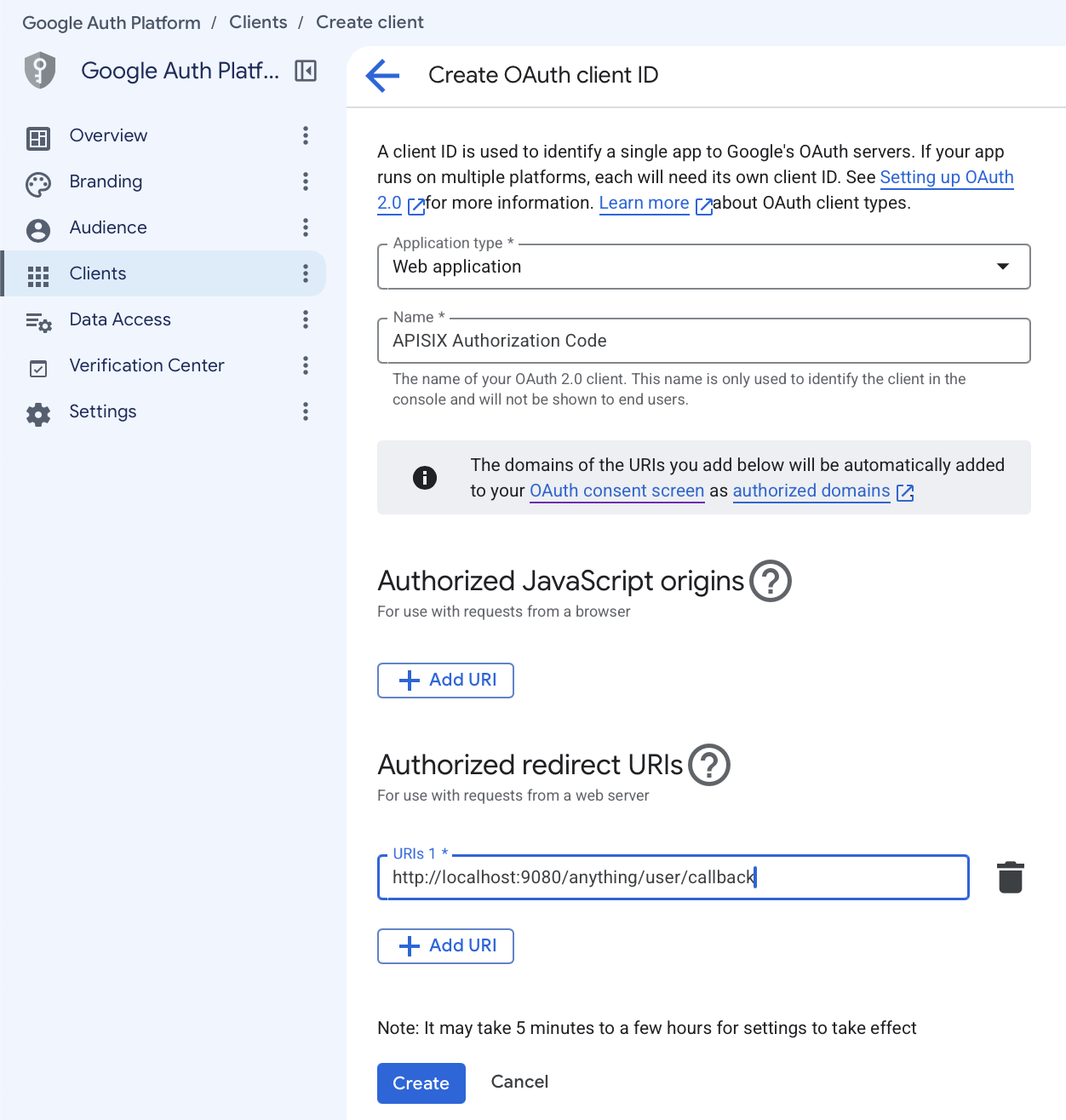
创建 Google 用于标识 APISIX 的 Web 应用客户端:
- 选择客户端 → 创建客户端。
- 选择 Web 应用作为应用类型。
- 输入
APISIX Authorization Code作为客户端名称。 - 在已获授权的重定向 URI 下,选择添加 URI,然后输入
http://localhost:9080/anything/user/callback。 - 选择创建。
Google 会在客户端创建后显示客户端 ID 和客户端密钥。请在关闭对话框前复制这两个值。之后仍可在客户端详情页查看客户端 ID,但 Google 不会再次显示或提供客户端密钥下载。如果密钥丢失,请添加新的客户端密钥。
在生产环境中,请使用用户可以访问的 HTTPS 重定向端点,并在 OAuth 客户端中注册完全一致的 URI。
保存 OIDC 配置
将客户端 ID、客户端密钥和 Google 发现文档 URL 保存到环境变量,并替换示例值:
export GOOGLE_CLIENT_ID=replace-with-your-client-id
export GOOGLE_CLIENT_SECRET=replace-with-your-client-secret
export GOOGLE_DISCOVERY=https://accounts.google.com/.well-known/openid-configuration
请妥善保护客户端密钥。生产环境中的凭证应存储在密钥管理器中,并按照组织的凭证轮换策略进行轮换。
配置 APISIX
配置一条路由,在将请求转发到公共 HTTP 请求与响应服务 httpbin.org 前对浏览器请求进行身份认证。/anything/user/* 端点会返回请求详情,以便验证配置。
生成一个唯一密钥,供 APISIX 用于加密浏览器会话 Cookie 并验证其完整性:
export APISIX_SESSION_SECRET="$(openssl rand -hex 32)"
选择使用 Admin API 或 ADC 配置路由。
- Admin API
- ADC
通过 Admin API 创建路由:
curl "http://127.0.0.1:9180/apisix/admin/routes/google-sso" -X PUT \
  --data-binary @- <<EOF
{
  "uri": "/anything/user/*",
  "plugins": {
    "openid-connect": {
      "client_id": "$GOOGLE_CLIENT_ID",
      "client_secret": "$GOOGLE_CLIENT_SECRET",
      "discovery": "$GOOGLE_DISCOVERY",
      "redirect_uri": "http://localhost:9080/anything/user/callback",
      "bearer_only": false,
      "use_pkce": true,
      "scope": "openid profile email",
      "session": {
        "secret": "$APISIX_SESSION_SECRET"
      },
      "set_access_token_header": false,
      "set_id_token_header": false,
      "set_userinfo_header": false
    },
    "proxy-rewrite": {
      "headers": {
        "remove": ["Authorization", "Cookie"]
      }
    }
  },
  "upstream": {
    "type": "roundrobin",
    "nodes": {
      "httpbin.org:80": 1
    }
  }
}
EOF
❶ discovery:Google OIDC 发现文档的 URI。
❷ redirect_uri:Google 在身份认证完成后将浏览器返回到的 URI。它必须与 OAuth 客户端中配置的已获授权的重定向 URI 完全一致。
❸ bearer_only 和 use_pkce:当不存在有效会话时启动浏览器身份认证,并在授权请求中发送 S256 PKCE 质询。
❹ set_access_token_header、set_id_token_header 和 set_userinfo_header:设置为 false,防止 APISIX 将令牌和用户信息添加到上游请求头中。
❺ proxy-rewrite.headers.remove:在代理请求前删除原始 Authorization 请求头和整个 Cookie 请求头(包括 APISIX 会话 Cookie)。如果上游应用需要 Cookie,请重新评估此设置。
创建包含路由配置的 adc.yaml 文件:
services:
  - name: google-sso
    routes:
      - name: google-sso
        uris:
          - /anything/user/*
        plugins:
          openid-connect:
            client_id: "${GOOGLE_CLIENT_ID}"
            client_secret: "${GOOGLE_CLIENT_SECRET}"
            discovery: "${GOOGLE_DISCOVERY}"
            redirect_uri: http://localhost:9080/anything/user/callback
            bearer_only: false
            use_pkce: true
            scope: openid profile email
            session:
              secret: "${APISIX_SESSION_SECRET}"
            set_access_token_header: false
            set_id_token_header: false
            set_userinfo_header: false
          proxy-rewrite:
            headers:
              remove:
                - Authorization
                - Cookie
    upstream:
      type: roundrobin
      nodes:
        - host: httpbin.org
          port: 80
          weight: 1
❶ discovery:Google OIDC 发现文档的 URI。
❷ redirect_uri:Google 在身份认证完成后将浏览器返回到的 URI。它必须与 OAuth 客户端中配置的已获授权的重定向 URI 完全一致。
❸ bearer_only 和 use_pkce:当不存在有效会话时启动浏览器身份认证,并在授权请求中发送 S256 PKCE 质询。
❹ set_access_token_header、set_id_token_header 和 set_userinfo_header:设置为 false,防止 APISIX 将令牌和用户信息添加到上游请求头中。
❺ proxy-rewrite.headers.remove:在代理请求前删除原始 Authorization 请求头和整个 Cookie 请求头(包括 APISIX 会话 Cookie)。如果上游应用需要 Cookie,请重新评估此设置。
ADC 会将服务作为期望状态进行协调。标签选择器将此示例限制在其自身带标签的资源内。请先预览限定范围的变更,并确认其中没有意外更新或删除:
adc diff -f adc.yaml \
  --include-resource-type service \
  --label-selector docs-example=google-sso
同步已审查的服务配置:
adc sync -f adc.yaml \
  --include-resource-type service \
  --label-selector docs-example=google-sso
验证身份认证
在浏览器中访问 http://localhost:9080/anything/user/get。APISIX 会将你重定向到 Google。你可以选择测试帐号或登录该帐号,并查看应用请求的用户资料信息。
继续后,Google 会将浏览器返回到 APISIX,APISIX 随后将请求转发到 httpbin.org。响应应包含类似以下的字段:
{
  "args": {},
  "data": "",
  "files": {},
  "form": {},
  "headers": {
    "Accept": "text/html,application/xhtml+xml,application/xml;q=0.9,*/*;q=0.8",
    "Accept-Encoding": "gzip, deflate",
    "Accept-Language": "en-CA,en-US;q=0.9,en;q=0.8",
    "Host": "localhost",
    "Priority": "u=0, i",
    "Sec-Fetch-Dest": "document",
    "Sec-Fetch-Mode": "navigate",
    "Sec-Fetch-Site": "cross-site",
    "Upgrade-Insecure-Requests": "1",
    "User-Agent": "Mozilla/5.0 (Macintosh; Intel Mac OS X 10_15_7) AppleWebKit/605.1.15 (KHTML, like Gecko) Version/18.6 Safari/605.1.15",
    "X-Amzn-Trace-Id": "Root=1-...",
    "X-Forwarded-Host": "localhost:9080"
  },
  "json": null,
  "method": "GET",
  "origin": "192.168.155.1, xxx.xxx.xxx.xxx",
  "url": "http://localhost:9080/anything/user/get"
}
请求头中的值和所报告的来源地址会因浏览器和网络环境而异。
发送到上游的请求头不应包含 APISIX 会话 Cookie、访问令牌、ID 令牌或用户信息请求头。重新加载页面,验证 APISIX 会复用浏览器会话,而不会再次将你重定向到 Google。
后续步骤
你现已配置 APISIX 使用 Google 对浏览器请求进行身份认证。有关更多配置选项,请参阅 openid-connect 插件参考文档。