DevOps 声明式配置和 CI/CD 管道
本文档将引导你使用声明式配置工具 ADC(APISIX/API7 Declarative Configuration CLI)来设置 API7 企业版。为实现配置的自动化 GitOps 管理,我们将 adc.yaml 文件作为配置的唯一真实来源。
ADC 简介
ADC 将 adc.yaml 文件作为唯一的来源,并自动将配置同步至 API 网关,从而确保网关的实时状态与 adc.yaml 中定义的配置状态保持一致。
步骤
- 配置 ADC 并将其连接到网关实例
- 发布配置、代理请求并为消费者启用密钥认证
- 修改配置并应用更改
注意事项
-
本文档以 API7 企业版网关 v3.2.10.0 为例,该版本基于 Apache APISIX 3.2,尚不支持配置验证 API。因此,你无法使用 ADC 的验证命令进行配置验证。该功能将从 Apache APISIX 的 v3.5 版本以后开始提供。
-
ADC 支持加载 OpenAPI 3.0 规范文件,也支持将其转换为
adc.yaml格式。但转换后的文件需要你手动进行调整,例如添加身份验证策略及绑定服务 ID。为提供更加流畅的用户体验,这些功能正在计划中。 -
企业可能采用不同的 Git/SVN 版本控制服务和防火墙策略。只要 ADC 工具能够通过网络访问到网关的 Admin API,它就能够正常工作。本文档中的示例操作将在本地计算机上进行演示。
前提条件
- API7 企业版:3.2.10.1
- ADC:0.8.0
部署 API7 企业版
API7 企业版支持 Docker 和 Kubernetes 两种部署方式。请结合自身的业务需求和技术栈选择合适的部署方法。
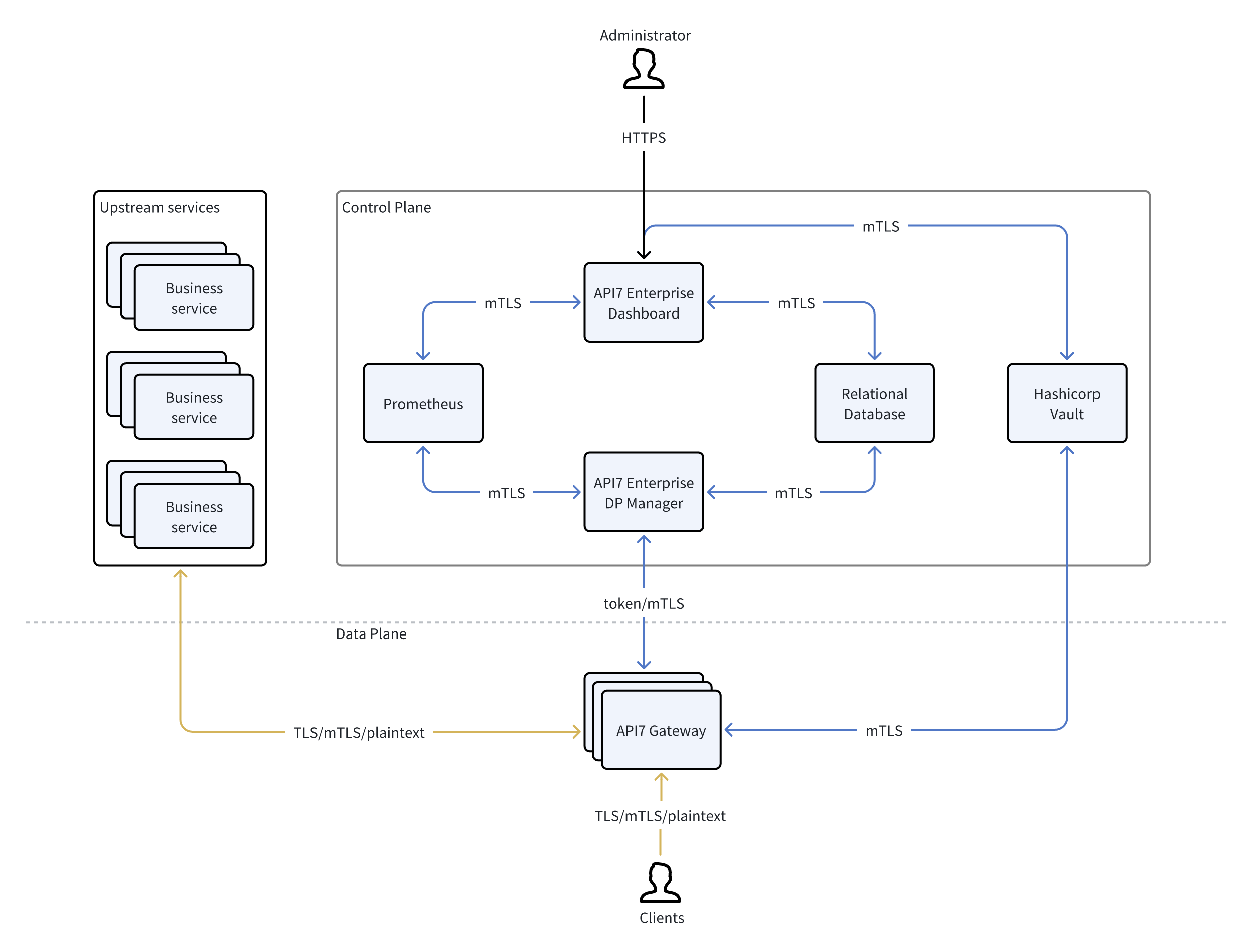
部署 API7 企业版后,你应该可以看到以下组件和信息:
- Dashboard 组件:
7443/7080 端口 - API7 Gateway 组件:
http://152.42.234.39:9080 - Admin API:
https://152.42.234.39:7443
下载 ADC
$ ./adc -h

Usage: adc [options] [command]

Options:
  -V, --version   output the version number
  -h, --help      display help for command

Commands:
  ping [options]  Verify connectivity with backend
  dump [options]  Dump configurations from the backend
  diff [options]  Show the difference between local and backend configurations
  sync [options]  Sync local configurations to backend
  convert         Convert other API spec to ADC configurations
  lint [options]  Check provided configuration files, local execution only, ensuring inputs meet ADC requirements
  help [command]  display help for com
步骤
生成 API Token
ADC 需要一个 API Token 来访问 Admin API,你可以通过 Dashboard 或 Admin API 生成 API Token。
- 从 Dashboard 生成 API Token:登录 -> 组织 -> Token -> 生成新 Token
- 在 Admin API 中生成 API Token
配置 ADC 证书
- 在与 ADC 二进制文件相同的目录中创建一个
.env文件。
本文档创建了一个 .env 文件来存储 API Token 和 Admin API 端点。你还可以将这些值作为标志传递或存储在 GitHub Action、Jenkins 或 GitLab 中。
ADC_BACKEND=api7ee
ADC_SERVER=https://152.42.234.39:7443
ADC_TOKEN=a7ee-6baF8488i8wJ5aj7mEo3BT705573eC8GH905qGrdn889zUWcR37df66a34e9954b61918c5dfd13abce3e
- 验证 Admin API 是否可访问。
$ ./adc ping

Connected to backend successfully!
发布配置
- 创建
adc.yaml文件:
services:
  - name: SOAP Service
    description: "This Service is for SOAP requests"
    upstream:
      name: default
      scheme: https
      type: roundrobin
      hash_on: vars
      nodes:
        - host: apps.learnwebservices.com
          port: 443
          weight: 1
          priority: 0
      retry_timeout: 0
      pass_host: pass
    routes:
      - uris:
          - /services/hello
        name: SOAP proxy
        methods:
          - POST
      - uris:
          - /SayHello
        name: REST to SOAP
        methods:
          - POST
        plugins:
          soap:
            wsdl_url: https://apps.learnwebservices.com/services/hello?wsdl
  - name: httpbin Service
    description: "This is the httpbin Services proxy service"
    labels:
      app: httpbin
      custom_key: custom_value
    routes:
      - name: Generate UUID
        methods:
          - GET
        uris:
          - /uuid
      - name: Anything
        methods:
          - GET
        uris:
          - /anything
        plugins:
          key-auth:
            _meta:
              disable: false
      - name: Rate Limited IP
        methods:
          - GET
        uris:
          - /ip
        plugins:
          limit-count:
            _meta:
              disable: false
            count: 2
            time_window: 10
            rejected_code: 429
            policy: local
    upstream:
      name: default
      scheme: http
      type: roundrobin
      hash_on: vars
      nodes:
        - host: httpbin.org
          port: 80
          weight: 1
          priority: 0
      retry_timeout: 0
      pass_host: pass
  - name: SSE Service
    labels:
      service: sse
    upstream:
      scheme: https
      nodes:
        - host: www.esegece.com
          port: 2053
          weight: 1
          priority: 0
      type: roundrobin
      pass_host: node
    plugins:
      proxy-buffering:
        disable_proxy_buffering: true
    routes:
      - name: SSE API
        uris:
          - /sse
        methods:
          - GET
consumers:
  - username: tom
    plugins:
      key-auth:
        key: tomskey
ssls: []
global_rules: {}
- 同步
adc.yaml至网关实例
$ ./adc sync -f adc.yaml

✔ Load local configuration
✔ Load remote configuration
✔ Diff configuration
✔ Sync configuration
- 验证代理
$ curl 152.42.234.39:9080/uuid -v

*   Trying 152.42.234.39:9080...
* Connected to 152.42.234.39 (152.42.234.39) port 9080
> GET /uuid HTTP/1.1
> Host: 152.42.234.39:9080
> User-Agent: curl/8.4.0
> Accept: */*
>
< HTTP/1.1 200 OK
< Content-Type: application/json
< Content-Length: 53
< Connection: keep-alive
< Date: Wed, 17 Apr 2024 09:56:22 GMT
< Access-Control-Allow-Origin: *
< Access-Control-Allow-Credentials: true
< Server: API7/3.2.8
<

{
  "uuid": "22b888f4-9e96-4d09-93a2-408b14e772fe"
}

* Connection #0 to host 152.42.234.39 left intact
- 验证插件:Key Authentication
$ curl 152.42.234.39:9080/anything

{"message":"Missing API key found in request"}

$ curl 152.42.234.39:9080/anything -H "apikey: tomskey"

{
  "args": {},
  "data": "",
  "files": {},
  "form": {},
  "headers": {
    "Accept": "*/*",
    "Apikey": "tomskey",
    "Host": "152.42.234.39",
    "User-Agent": "curl/8.4.0",
    "X-Amzn-Trace-Id": "Root=1-661f9d57-42c4a66b07b361713713da44",
    "X-Forwarded-Host": "152.42.234.39"
  },
  "json": null,
  "method": "GET",
  "origin": "182.255.32.50, 152.42.234.39",
  "url": "http://152.42.234.39/anything"
}
修改配置并应用更改
- 将
adc.yaml更新为以下配置(为 httpbin 服务添加一个新路由/headers):
services:
  - name: SOAP Service
    description: ""
    upstream:
      name: default
      scheme: https
      type: roundrobin
      hash_on: vars
      nodes:
        - host: apps.learnwebservices.com
          port: 443
          weight: 1
          priority: 0
      retry_timeout: 0
      pass_host: pass
    routes:
      - uris:
          - /services/hello
        name: SOAP proxy
        methods:
          - POST
      - uris:
          - /SayHello
        name: REST to SOAP
        methods:
          - POST
        plugins:
          soap:
            wsdl_url: https://apps.learnwebservices.com/services/hello?wsdl
  - name: httpbin Service
    description: ""
    labels:
      app: httpbin
      custom_key: custom_value
    routes:
      - name: Get Headers
        methods:
          - GET
        uris:
          - /headers
      - name: Generate UUID
        methods:
          - GET
        uris:
          - /uuid
      - name: Anything
        methods:
          - GET
        uris:
          - /anything
        plugins:
          key-auth:
            _meta:
              disable: false
      - name: Rate Limited IP
        methods:
          - GET
        uris:
          - /ip
        plugins:
          limit-count:
            _meta:
              disable: false
            count: 2
            time_window: 10
            rejected_code: 429
            policy: local
    upstream:
      name: default
      scheme: http
      type: roundrobin
      hash_on: vars
      nodes:
        - host: httpbin.org
          port: 80
          weight: 1
          priority: 0
      retry_timeout: 0
      pass_host: pass
  - name: SSE Service
    labels:
      service: sse
    upstream:
      scheme: https
      nodes:
        - host: www.esegece.com
          port: 2053
          weight: 1
          priority: 0
      type: roundrobin
      pass_host: node
    plugins:
      proxy-buffering:
        disable_proxy_buffering: true
    routes:
      - name: SSE API
        uris:
          - /sse
        methods:
          - GET
consumers:
  - username: tom
    plugins:
      key-auth:
        key: tomskey
ssls: []
global_rules: {}
- 确定本地配置和远程配置之间的差异。
ADC 仍在开发中,差异算法将会优化。
$ ./adc diff -f ./adc.yaml

✔ Load local configuration
✔ Load remote configuration
✔ Diff configuration
  › update consumer: "tom"
    update route: "REST to SOAP"
    update route: "SOAP proxy"
    update route: "Rate Limited IP"
    update route: "Anything"
    update route: "Generate UUID"
    create route: "Get Headers"
    update service: "SSE Service"
    update route: "SSE API"
    Summary: 1 will be created, 8 will be updated, 0 will be deleted
✔ Write detail diff result to file
此命令还会生成一个带有详细差异的 diff.yaml 文件。
- resourceType: consumer
  type: update
  resourceId: tom
  resourceName: tom
  oldValue:
    username: tom
    description: ""
    plugins:
      key-auth:
        key: tomskey
  newValue:
    username: tom
    plugins:
      key-auth:
        key: tomskey
  diff:
    added: {}
    deleted: {}
    updated: {}
- resourceType: route
  type: update
  resourceId: bef0a3351a392e74c960f9a58c1d025d803f2aef
  resourceName: REST to SOAP
  oldValue:
    uris:
      - /SayHello
    name: REST to SOAP
    methods:
      - POST
    enable_websocket: false
    plugins:
      soap:
        wsdl_url: https://apps.learnwebservices.com/services/hello?wsdl
  newValue:
    uris:
      - /SayHello
    name: REST to SOAP
    methods:
      - POST
    plugins:
      soap:
        wsdl_url: https://apps.learnwebservices.com/services/hello?wsdl
  diff:
    added: {}
    deleted: {}
    updated: {}
  parentId: 602dfcf4c39218f87d40c5d1df8b531b49ca88e8
- resourceType: route
  type: update
  resourceId: da37e65d428446d156279156ac3248c00d0a1533
  resourceName: SOAP proxy
  oldValue:
    uris:
      - /services/hello
    name: SOAP proxy
    methods:
      - POST
    enable_websocket: false
  newValue:
    uris:
      - /services/hello
    name: SOAP proxy
    methods:
      - POST
  diff:
    added: {}
    deleted: {}
    updated: {}
  parentId: 602dfcf4c39218f87d40c5d1df8b531b49ca88e8
- resourceType: route
  type: update
  resourceId: b586591b59c13461ed8932228cb23e53040c09d4
  resourceName: Rate Limited IP
  oldValue:
    uris:
      - /ip
    name: Rate Limited IP
    methods:
      - GET
    enable_websocket: false
    plugins:
      limit-count:
        _meta:
          disable: false
        count: 2
        policy: local
        rejected_code: 429
        time_window: 10
  newValue:
    name: Rate Limited IP
    methods:
      - GET
    uris:
      - /ip
    plugins:
      limit-count:
        _meta:
          disable: false
        count: 2
        time_window: 10
        rejected_code: 429
        policy: local
  diff:
    added: {}
    deleted: {}
    updated: {}
  parentId: 5ce4033cfe1015450e0b81186f7d54b9327cc302
- resourceType: route
  type: update
  resourceId: 5f2de5df1a292b4c8a73f0ec23271233d75707c6
  resourceName: Anything
  oldValue:
    uris:
      - /anything
    name: Anything
    methods:
      - GET
    enable_websocket: false
    plugins:
      key-auth:
        _meta:
          disable: false
  newValue:
    name: Anything
    methods:
      - GET
    uris:
      - /anything
    plugins:
      key-auth:
        _meta:
          disable: false
  diff:
    added: {}
    deleted: {}
    updated: {}
  parentId: 5ce4033cfe1015450e0b81186f7d54b9327cc302
- resourceType: route
  type: update
  resourceId: ed048a2f75fe33eab67319810fbb94bb778d7d97
  resourceName: Generate UUID
  oldValue:
    uris:
      - /uuid
    name: Generate UUID
    methods:
      - GET
    enable_websocket: false
  newValue:
    name: Generate UUID
    methods:
      - GET
    uris:
      - /uuid
  diff:
    added: {}
    deleted: {}
    updated: {}
  parentId: 5ce4033cfe1015450e0b81186f7d54b9327cc302
- resourceType: route
  resourceId: 6b124aff482499cbf7bdad5a56b13205b24ba58e
  resourceName: Get Headers
  type: create
  newValue:
    name: Get Headers
    methods:
      - GET
    uris:
      - /headers
  parentId: 5ce4033cfe1015450e0b81186f7d54b9327cc302
- resourceType: service
  type: update
  resourceId: 54154d3cdf6379ab8686890d27fabb6bf8fa3ace
  resourceName: SSE Service
  oldValue:
    name: SSE Service
    description: ""
    labels:
      service: sse
    upstream:
      name: default
      scheme: https
      type: roundrobin
      hash_on: vars
      nodes:
        - host: www.esegece.com
          port: 2053
          weight: 1
          priority: 0
      retry_timeout: 0
      pass_host: node
    plugins:
      proxy-buffering:
        disable_proxy_buffering: true
  newValue:
    name: SSE Service
    labels:
      service: sse
    upstream:
      scheme: https
      nodes:
        - host: www.esegece.com
          port: 2053
          weight: 1
          priority: 0
      type: roundrobin
      pass_host: node
    plugins:
      proxy-buffering:
        disable_proxy_buffering: true
  diff:
    added: {}
    deleted:
      upstream: {}
    updated: {}
  subEvents:
    - &a1
      resourceType: route
      type: update
      resourceId: 6b808fa543c7c3391321b813d0dc2d658ab02c10
      resourceName: SSE API
      oldValue:
        uris:
          - /sse
        name: SSE API
        methods:
          - GET
        enable_websocket: false
      newValue:
        name: SSE API
        uris:
          - /sse
        methods:
          - GET
      diff:
        added: {}
        deleted: {}
        updated: {}
      parentId: 54154d3cdf6379ab8686890d27fabb6bf8fa3ace
- *a1
- 应用更改
$ ./adc sync -f ./adc.yaml

✔ Load local configuration
✔ Load remote configuration
✔ Diff configuration
✔ Sync configuration
- 验证
注意:由于已经为 httpbin 服务添加了一个新路由 /headers,你可以访问新路由,并且它应该返回请求头信息。
$ curl 152.42.234.39:9080/headers

{
  "headers": {
    "Accept": "*/*",
    "Host": "152.42.234.39",
    "User-Agent": "curl/8.4.0",
    "X-Amzn-Trace-Id": "Root=1-661f9edd-188a0adf5d3bf0a509f5b034",
    "X-Forwarded-Host": "152.42.234.39"
  }
}
结论
本文档演示了如何使用 ADC 工具发布配置、代理请求,以及为消费者启用密钥验证。
你还可以修改配置并将更改应用到网关实例。ADC 工具是一个强大的工具,可以帮助你有效地管理 API 网关配置。将 ADC 与你的 CI/CD 管道集成后,你可以进行自动化的配置发布和验证,这有助于确保你配置的准确性和 API 的安全性。