代理 Azure OpenAI 请求
Azure OpenAI 提供对托管在 Microsoft Azure 上的 OpenAI 模型的访问。
本指南介绍如何使用 ai-proxy 插件向 Azure OpenAI 发送 Chat Completions 和 Responses API 请求。APISIX 会附加 Azure API Key 和部署名称,因此客户端无需提供服务提供方凭证,也无需直接选择部署。
openai-compatible 服务提供方使用已配置的上游端点。请为每个 Azure OpenAI API 路径分别配置 APISIX 路由。
前置条件
- 安装 Docker。
- 安装 cURL 以发送验证请求。
- 按照快速入门教程在 Docker 或 Kubernetes 中启动 APISIX 实例。
- 如果已启用 Admin API Key 身份认证,请将一个有效 Key 导出为
ADMIN_API_KEY。 - 拥有 Azure 订阅,并具备创建或使用 Azure OpenAI 资源及部署模型的权限。
创建模型部署
按照 Microsoft 文档创建 Azure OpenAI 资源并部署模型。如需使用本指南中的两种 API,请选择同时支持 Chat Completions 和 Responses API 的部署,并确认资源所在区域支持 Responses API。
配置网络访问,使 APISIX 能够连接 Azure OpenAI 端点。请根据运行环境使用私有连接,或将公共访问限制为受信任的出口地址。
部署就绪后,记录以下值:
- Azure OpenAI 资源名称。
- 该资源的 API Key。
- 模型部署名称,该名称可能与底层模型名称不同。
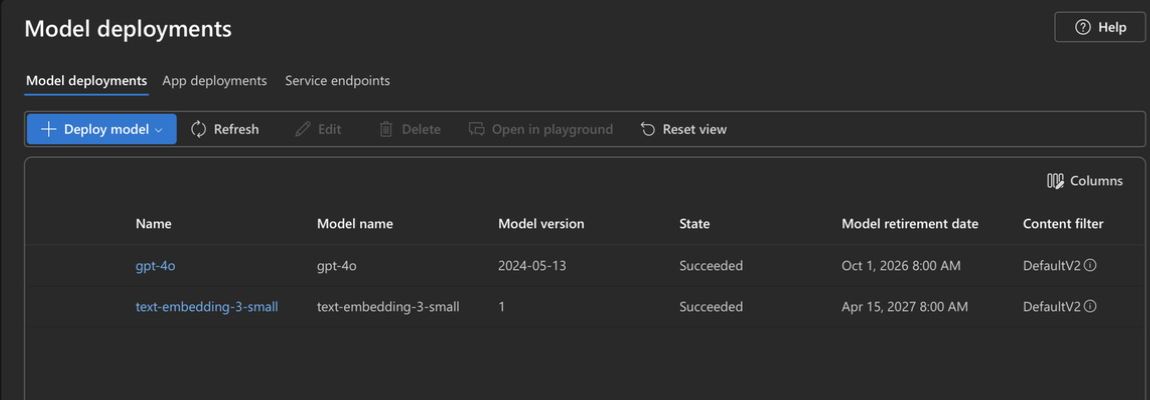
在 Microsoft Foundry 中打开 Deployments,确认模型部署状态为 Succeeded:
将这些值和 API 端点导出为环境变量:
export AZURE_OPENAI_API_KEY="<your-api-key>"
export AZURE_OPENAI_DEPLOYMENT="<your-deployment-name>"
export AZURE_OPENAI_CHAT_ENDPOINT="https://<your-resource-name>.openai.azure.com/openai/v1/chat/completions"
export AZURE_OPENAI_RESPONSES_ENDPOINT="https://<your-resource-name>.openai.azure.com/openai/v1/responses"
如果所选模型标记为限制访问,请完成 Microsoft 限制访问文档中说明的所有必要审批流程。
直接验证 Azure OpenAI
配置 APISIX 之前,请先验证部署、凭证和两个 API 端点。
- Chat Completions
- Responses API
curl -i "${AZURE_OPENAI_CHAT_ENDPOINT}" -X POST \
  -H "Content-Type: application/json" \
  -H "api-key: ${AZURE_OPENAI_API_KEY}" \
  --data-binary @- <<EOF
  {
    "model": "${AZURE_OPENAI_DEPLOYMENT}",
    "messages": [
      {
        "role": "user",
        "content": "Respond with the word ready."
      }
    ]
  }
EOF
curl -i "${AZURE_OPENAI_RESPONSES_ENDPOINT}" -X POST \
  -H "Content-Type: application/json" \
  -H "api-key: ${AZURE_OPENAI_API_KEY}" \
  --data-binary @- <<EOF
  {
    "model": "${AZURE_OPENAI_DEPLOYMENT}",
    "input": "Respond with the word ready."
  }
EOF
每个请求都应返回包含模型输出的 HTTP 200 响应。
创建 Azure OpenAI 路由
APISIX 根据 messages 字段识别 Chat Completions 请求;根据 input 字段以及以 /v1/responses 结尾的传入 URI 识别 Responses 请求。Azure OpenAI 使用部署专属端点,因此每个路由还需要覆盖相应的上游端点。
分别为 Chat Completions 和 Responses API 创建路由:
- Admin API
- ADC
创建 Chat Completions 路由:
curl "http://127.0.0.1:9180/apisix/admin/routes" -X PUT \
  -H "X-API-KEY: ${ADMIN_API_KEY}" \
  -H "Content-Type: application/json" \
  --data-binary @- <<EOF
  {
    "id": "azure-openai-chat",
    "uri": "/azure-openai/chat/completions",
    "methods": ["POST"],
    "plugins": {
      "ai-proxy": {
        "provider": "openai-compatible",
        "auth": {
          "header": {
            "api-key": "${AZURE_OPENAI_API_KEY}"
          }
        },
        "options": {
          "model": "${AZURE_OPENAI_DEPLOYMENT}"
        },
        "override": {
          "endpoint": "${AZURE_OPENAI_CHAT_ENDPOINT}"
        }
      }
    }
  }
EOF
创建 Responses API 路由:
curl "http://127.0.0.1:9180/apisix/admin/routes" -X PUT \
  -H "X-API-KEY: ${ADMIN_API_KEY}" \
  -H "Content-Type: application/json" \
  --data-binary @- <<EOF
  {
    "id": "azure-openai-responses",
    "uri": "/azure-openai/v1/responses",
    "methods": ["POST"],
    "plugins": {
      "ai-proxy": {
        "provider": "openai-compatible",
        "auth": {
          "header": {
            "api-key": "${AZURE_OPENAI_API_KEY}"
          }
        },
        "options": {
          "model": "${AZURE_OPENAI_DEPLOYMENT}"
        },
        "override": {
          "endpoint": "${AZURE_OPENAI_RESPONSES_ENDPOINT}"
        }
      }
    }
  }
EOF
❶ 配置任意面向客户端的 Chat Completions 路径。APISIX 仅根据 messages 字段识别该格式。
❷ 配置面向客户端的 Responses 请求路径。该路径可以有自定义前缀,但必须以 /v1/responses 结尾。APISIX 根据该后缀和 input 字段识别该格式。
❸ Azure OpenAI v1 API 使用 openai-compatible。
❹ 在 api-key 请求头中附加 Azure OpenAI API Key。
❺ 将模型选项设为 Azure 部署名称。APISIX 会把它添加到每个请求体中。
❻ 为该路由所用 API 设置完整的上游端点。
services:
  - name: Azure OpenAI Service
    routes:
      - uris:
          - /azure-openai/chat/completions
        methods:
          - POST
        name: azure-openai-chat
        plugins:
          ai-proxy:
            provider: openai-compatible
            auth:
              header:
                api-key: ${AZURE_OPENAI_API_KEY}
            options:
              model: ${AZURE_OPENAI_DEPLOYMENT}
            override:
              endpoint: ${AZURE_OPENAI_CHAT_ENDPOINT}
      - uris:
          - /azure-openai/v1/responses
        methods:
          - POST
        name: azure-openai-responses
        plugins:
          ai-proxy:
            provider: openai-compatible
            auth:
              header:
                api-key: ${AZURE_OPENAI_API_KEY}
            options:
              model: ${AZURE_OPENAI_DEPLOYMENT}
            override:
              endpoint: ${AZURE_OPENAI_RESPONSES_ENDPOINT}
❶ 配置任意面向客户端的 Chat Completions 路径。APISIX 仅根据 messages 字段识别该格式。
❷ 配置面向客户端的 Responses 请求路径。该路径可以有自定义前缀,但必须以 /v1/responses 结尾。APISIX 根据该后缀和 input 字段识别该格式。
❸ Azure OpenAI v1 API 使用 openai-compatible。
❹ 在 api-key 请求头中附加 Azure OpenAI API Key。
❺ 将模型选项设为 Azure 部署名称。APISIX 会把它添加到每个请求体中。
❻ 为该路由所用 API 设置完整的上游端点。
将配置同步到 APISIX:
adc sync -f adc.yaml
路由配置包含 Azure API Key。启用密钥环数据加密后,APISIX 会在将路由保存到 etcd 之前加密该 Key。生产环境中请配置自定义密钥环。
验证路由
分别使用两种 API 格式发送非流式和流式请求,以验证路由。
发送 Chat Completions 请求
发送包含消息列表的请求。APISIX 会添加配置的部署名称,因此请求无需包含 Azure 部署名称:
curl -i "http://127.0.0.1:9080/azure-openai/chat/completions" -X POST \
  -H "Content-Type: application/json" \
  -d '{
    "messages": [
      {
        "role": "system",
        "content": "You explain technical concepts concisely."
      },
      {
        "role": "user",
        "content": "Explain what an API gateway does in one sentence."
      }
    ]
  }'
你应该收到 HTTP 200 响应,其中 choices 包含助手消息:
{
  "choices": [
    {
      "message": {
        "role": "assistant",
        "content": "An API gateway routes, secures, and manages requests between clients and backend services."
      }
    }
  ]
}
以流式方式发送 Chat Completions 请求
发送流式请求:
curl "http://127.0.0.1:9080/azure-openai/chat/completions" -X POST \
  --no-buffer \
  -H "Content-Type: application/json" \
  -d '{
    "stream": true,
    "messages": [
      {
        "role": "user",
        "content": "Count from one to five."
      }
    ]
  }'
❶ 禁用 cURL 输出缓冲,使其在每个事件到达时立即显示。
❷ 请求 Azure OpenAI 返回流式响应。
Azure OpenAI 以服务器发送事件返回部分消息增量,并使用 data: [DONE] 事件结束 Chat Completions 数据流。
发送 Responses API 请求
发送包含独立指令和输入的请求。APISIX 会添加配置的部署名称:
curl -i "http://127.0.0.1:9080/azure-openai/v1/responses" -X POST \
  -H "Content-Type: application/json" \
  -d '{
    "instructions": "You explain technical concepts concisely.",
    "input": "Explain what an API gateway does in one sentence."
  }'
你应该收到 HTTP 200 响应,其中 output 包含带类型的条目:
{
  "status": "completed",
  "output": [
    {
      "type": "message",
      "role": "assistant",
      "content": [
        {
          "type": "output_text",
          "text": "An API gateway routes, secures, and manages requests between clients and backend services."
        }
      ]
    }
  ]
}
以流式方式发送 Responses API 请求
发送流式请求:
curl "http://127.0.0.1:9080/azure-openai/v1/responses" -X POST \
  --no-buffer \
  -H "Content-Type: application/json" \
  -d '{
    "stream": true,
    "input": "Count from one to five."
  }'
❶ 禁用 cURL 输出缓冲,使其在每个事件到达时立即显示。
❷ 请求 Azure OpenAI 返回流式响应。
Responses API 数据流使用带类型的服务器发送事件,包括携带生成文本的 response.output_text.delta 事件,以及最后的 response.completed 事件。
APISIX 会检测两种事件流格式,并默认以 10 毫秒的刷新间隔向下游输出。
ai-proxy 流式传输不需要 proxy-buffering 插件。该插件控制标准 NGINX 上游路径,而 ai-proxy 不使用这条路径发送服务提供方请求。如需更改 ai-proxy 刷新流式输出的频率,请配置 streaming_flush_interval_ms。将其设为 0 可同步刷新每个上游数据块。
清理
不再需要这两个 APISIX 路由时,请将其删除:
curl "http://127.0.0.1:9180/apisix/admin/routes/azure-openai-chat" -X DELETE \
  -H "X-API-KEY: ${ADMIN_API_KEY}"

curl "http://127.0.0.1:9180/apisix/admin/routes/azure-openai-responses" -X DELETE \
  -H "X-API-KEY: ${ADMIN_API_KEY}"
从 Shell 中删除凭证和端点值:
unset AZURE_OPENAI_API_KEY AZURE_OPENAI_DEPLOYMENT
unset AZURE_OPENAI_CHAT_ENDPOINT AZURE_OPENAI_RESPONSES_ENDPOINT
如果使用了 ADC,请从 adc.yaml 中删除 API Key,或按照组织的密钥处理策略保护该文件。
如果仅为本指南创建了 Azure 部署或资源,请在 Azure 中将其删除,以免继续产生费用。
下一步
现在,你已经配置 APISIX,使其能够通过 Azure OpenAI 进行身份认证,并发送 Chat Completions 和 Responses API 请求。
你可以添加限流来控制模型请求量。