限流限速
作为 API 网关,APISIX 充当海量请求的统一入口点,这些请求可能包含合法流量和不需要的流量。
限流限速是保护和管理 API 的常用技术之一。例如,你可以配置 API 端点以允许在给定时间段内进行一定数量的请求。这确保了上游服务的公平使用,并保护 API 免受潜在的网络攻击,如 DDoS(分布式拒绝服务)或网络爬虫的过度请求。
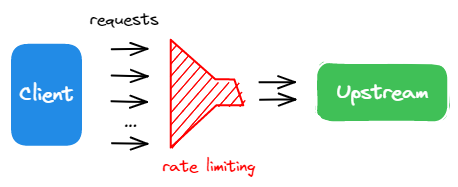
在本教程中,你将启用 limit-count 插件来对传入流量设置限流限速约束。
前置条件
- 完成 安装 APISIX 以在 Docker 或 Kubernetes 中安装 APISIX。
- 完成 配置路由。
- 如果使用这些工具,请安装 ADC 或 APISIX-MCP。
启用限流限速
- Admin API
- ADC
- APISIX-MCP
使用 limit-count 插件更新 配置路由 中的 getting-started-ip 路由:
curl -i "http://127.0.0.1:9180/apisix/admin/routes/getting-started-ip" -X PATCH -d '
{
  "plugins": {
    "limit-count": {
      "count": 2,
      "time_window": 10,
      "rejected_code": 429
    }
  }
}'
如果插件添加成功,你将收到 HTTP/1.1 200 OK 响应。
services:
  - name: httpbin Service
    routes:
      - uris:
          - /ip
        name: getting-started-ip
        plugins:
          limit-count:
            rejected_code: 429
            count: 2
            time_window: 10
    upstream:
      type: roundrobin
      nodes:
        - host: httpbin.org
          port: 80
          weight: 1
将配置同步到 APISIX:
adc sync -f adc.yaml
如果配置同步成功,你将收到类似的响应:
[11:25:49 AM] [ADC] › ✔  success   Sync configuration
[11:25:49 AM] [ADC] › ★  star      All is well, see you next time!
在你的 AI 客户端中输入以下提示:
Apply rate limiting to the getting-started-ip route to restrict access to 2 requests every 10 seconds, returning a 429 response when the limit is exceeded.
你应该看到类似的响应:
Successfully configured rate limiting for route 'getting-started-ip' with:

* Limit of 2 requests per 10 seconds
* Rate limiting by client IP address (remote_addr)
* HTTP 429 response when limit is exceeded
上述配置将传入请求限制为 10 秒内最多 2 个请求。
验证
- Admin API
- ADC
- APISIX-MCP
生成 50 个并发请求以查看限流限速插件的效果。
resp=$(seq 50 | xargs -I{} curl "http://127.0.0.1:9080/ip" -o /dev/null -s -w "%{http_code}\n") && \
  count_200=$(echo "$resp" | grep "200" | wc -l) && \
  count_429=$(echo "$resp" | grep "429" | wc -l) && \
  echo "200": $count_200, "429": $count_429
结果符合预期:在 50 个请求中,2 个请求发送成功(状态码 200),而其他请求被拒绝(状态码 429)。
"200": 2, "429": 48
生成 50 个并发请求以查看限流限速插件的效果。
resp=$(seq 50 | xargs -I{} curl "http://127.0.0.1:9080/ip" -o /dev/null -s -w "%{http_code}\n") && \
  count_200=$(echo "$resp" | grep "200" | wc -l) && \
  count_429=$(echo "$resp" | grep "429" | wc -l) && \
  echo "200": $count_200, "429": $count_429
结果符合预期:在 50 个请求中,2 个请求发送成功(状态码 200),而其他请求被拒绝(状态码 429)。
"200": 2, "429": 48
在你的 AI 客户端中输入以下提示:
Generate 50 consecutive requests to the APISIX /ip route to observe the load-balancing behavior, then count how many responses are 200 and how many are 429.
你应该看到类似的响应:
From 50 consecutive requests to the /ip route:

* Successful responses (HTTP 200): 2
* Rate limited responses (HTTP 429): 48

The rate limiting is working as configured (2 requests per 10 seconds). All requests beyond the limit received 429 responses. The two successful responses show the load balancing is working with the upstream httpbin.org service.
禁用限流限速
- Admin API
- ADC
- APISIX-MCP
通过将 _meta.disable 参数设置为 true 来禁用限流限速:
curl -i "http://127.0.0.1:9180/apisix/admin/routes/getting-started-ip" -X PATCH -d '
{
  "plugins": {
    "limit-count": {
      "_meta": {
        "disable": true
      }
    }
  }
}'
通过将 _meta.disable 参数设置为 true 来禁用限流限速:
services:
  - name: httpbin Service
    routes:
      - uris:
          - /ip
        name: getting-started-ip
        plugins:
          limit-count:
            rejected_code: 429
            count: 2
            time_window: 10
            _meta:
              disable: true
    upstream:
      type: roundrobin
      nodes:
        - host: httpbin.org
          port: 80
          weight: 1
将配置同步到 APISIX:
adc sync -f adc.yaml
在你的 AI 客户端中输入以下提示:
Disable the rate limiting plugin for route getting-started-ip while keeping its configuration intact.
你应该看到类似的响应:
Successfully disabled the limit-count plugin for route 'getting-started-ip' while maintaining all other configuration. The route now:

* Still matches requests to URI '/ip'
* Forwards to upstream httpbin.org:80
* Has rate limiting disabled (but configuration preserved)
验证
- Admin API
- ADC
- APISIX-MCP
再次生成 50 个请求以验证限流限速是否已禁用:
resp=$(seq 50 | xargs -I{} curl "http://127.0.0.1:9080/ip" -o /dev/null -s -w "%{http_code}\n") && \
  count_200=$(echo "$resp" | grep "200" | wc -l) && \
  count_429=$(echo "$resp" | grep "429" | wc -l) && \
  echo "200": $count_200, "429": $count_429
下面的结果显示所有请求都发送成功:
"200": 50, "429": 0
再次生成 50 个请求以验证限流限速是否已禁用:
resp=$(seq 50 | xargs -I{} curl "http://127.0.0.1:9080/ip" -o /dev/null -s -w "%{http_code}\n") && \
  count_200=$(echo "$resp" | grep "200" | wc -l) && \
  count_429=$(echo "$resp" | grep "429" | wc -l) && \
  echo "200": $count_200, "429": $count_429
下面的结果显示所有请求都发送成功:
"200": 50, "429": 0
在你的 AI 客户端中输入以下提示:
Generate 50 consecutive requests to the APISIX /ip route to observe the load-balancing behavior, then count how many responses are 200 and how many are 429.
你应该看到类似的响应:
From 50 consecutive requests to the /ip route:

* Successful responses (HTTP 200): 50
* Rate limited responses (HTTP 429): 0

The rate limiting has been disabled and is working as expected with all requests successfully reaching the upstream httpbin.org service.
更多
你可以使用 APISIX 变量 配置细粒度的限流限速匹配规则,例如 $host 和 $uri。此外,APISIX 还支持 使用 Redis 进行集群级别的限流限速。
下一步
你已经学习了如何配置限流限速并完成了快速入门教程。
你可以继续探索其他文档以自定义 APISIX 并满足你的生产需求。