灰度发布
灰度发布是一种通过逐渐增加流向新版本的流量来推出新版本的策略。这种策略可以帮助用真实流量测试新版本,以便在全面推出之前识别并修复任何问题。
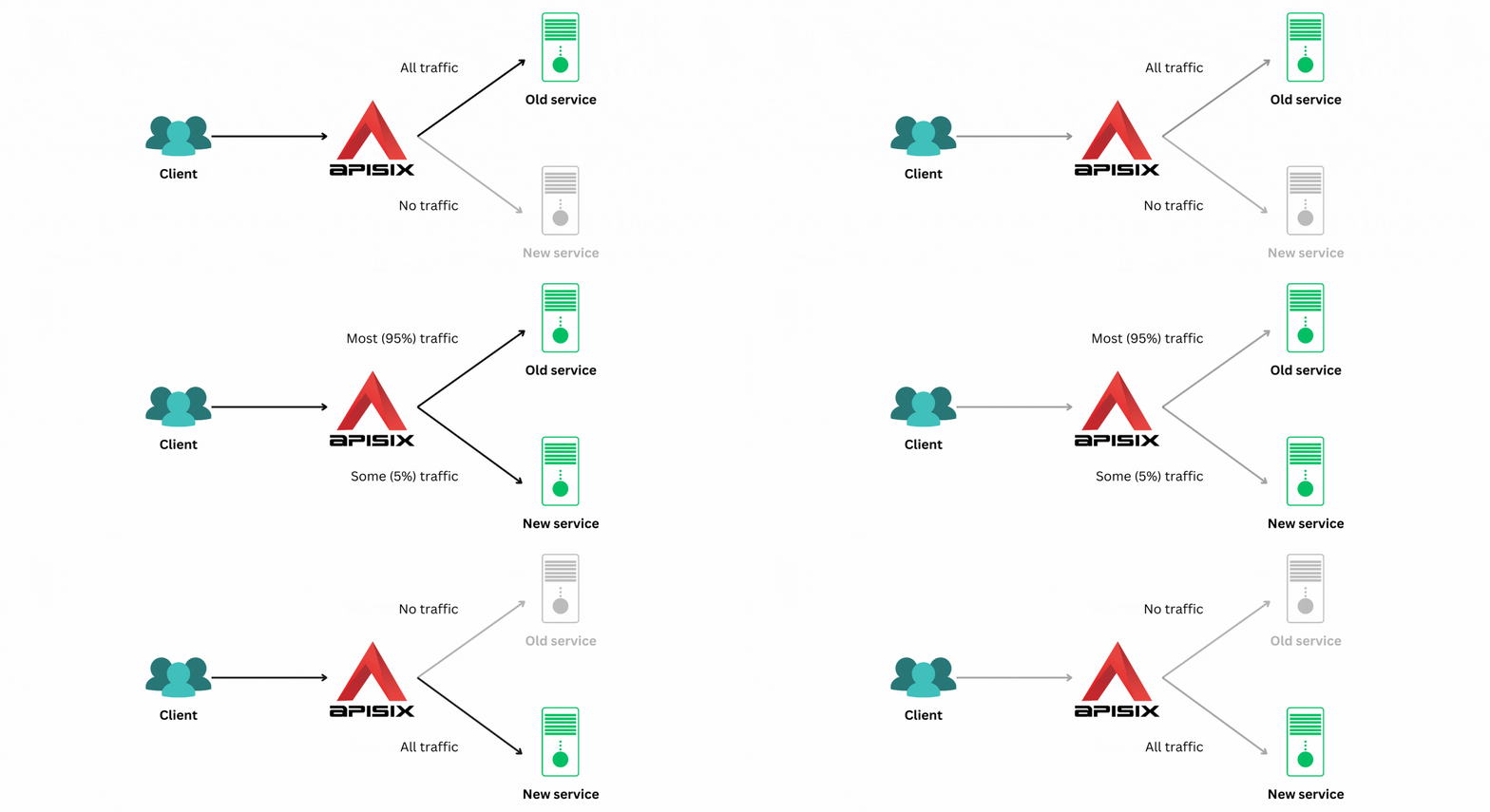
本指南将引导你完成使用 traffic-split 插件在 APISIX 中配置灰度发布的过程。
前置条件
- 如果使用 Admin API 示例且启用了身份验证,请将管理员角色的密钥导出为
ADMIN_API_KEY。请在deployment.admin.admin_key下配置该密钥。Docker 快速入门为了便于本地评估而禁用了身份验证;生产环境中请保持启用。
配置灰度发布
你将使用 httpbin.org 和 mock.api7.ai 作为旧服务和新服务。
首先,将所有流量引导到你的旧服务。为此,创建一个具有以下配置的路由:
- Admin API
- ADC
curl "http://127.0.0.1:9180/apisix/admin/routes" -X PUT \
  -H "X-API-KEY: ${ADMIN_API_KEY}" \
  -d '{
    "uri": "/headers",
    "id": "canary-deployment",
    "plugins": {
      "traffic-split": {
        "rules": [
          {
            "weighted_upstreams": [
              {
                "upstream": {
                  "type": "roundrobin",
                  "scheme": "https",
                  "pass_host": "node",
                  "nodes": {
                    "httpbin.org:443":1
                  }
                },
                "weight": 100
              },
              {
                "weight": 0
              }
            ]
          }
        ]
      }
    },
    "upstream": {
      "type": "roundrobin",
      "scheme": "https",
      "pass_host": "node",
      "nodes": {
        "mock.api7.ai:443":1
      }
    }
  }'
❶ 100% 的请求应路由到 httpbin.org。
❷ 0% 的请求应路由到 mock.api7.ai。
services:
  - name: canary-deployment-service
    labels:
      docs-example: canary-deployment
    routes:
      - uris:
          - /headers
        name: canary-deployment
        plugins:
          traffic-split:
            rules:
              - weighted_upstreams:
                  - weight: 100
                    upstream:
                      type: roundrobin
                      pass_host: node
                      nodes:
                        httpbin.org:443: 1
                      scheme: https
                  - weight: 0
    upstream:
      type: roundrobin
      pass_host: node
      nodes:
        - host: mock.api7.ai
          port: 443
          weight: 1
      scheme: https
❶ 100% 的请求应路由到 httpbin.org。
❷ 0% 的请求应路由到 mock.api7.ai。
ADC 会将服务作为期望状态进行协调。标签选择器会把本示例限制在自己的资源范围内。预览限定范围内的变更,并确认其中不包含意外的更新或删除:
adc diff -f adc.yaml \
  --include-resource-type service \
  --label-selector docs-example=canary-deployment
同步已审查的服务配置:
adc sync -f adc.yaml \
  --include-resource-type service \
  --label-selector docs-example=canary-deployment
因此,如果你发送 100 个请求,APISIX 会将它们全部定向到 httpbin.org:
resp=$(seq 100 | xargs -I{} curl "http://127.0.0.1:9080/headers" -sL) && \
  count_httpbin=$(echo "$resp" | grep "httpbin.org" | wc -l) && \
  count_mockapi7=$(echo "$resp" | grep "mock.api7.ai" | wc -l) && \
  echo httpbin.org: $count_httpbin, mock.api7.ai: $count_mockapi7
你将得到以下响应:
httpbin.org: 100, mock.api7.ai: 0
接下来,更新配置以将 5% 的请求定向到新服务:
- Admin API
- ADC
curl "http://127.0.0.1:9180/apisix/admin/routes" -X PUT \
  -H "X-API-KEY: ${ADMIN_API_KEY}" \
  -d '{
    "uri": "/headers",
    "id": "canary-deployment",
    "plugins": {
      "traffic-split": {
        "rules": [
          {
            "weighted_upstreams": [
              {
                "upstream": {
                  "type": "roundrobin",
                  "scheme": "https",
                  "pass_host": "node",
                  "nodes": {
                    "httpbin.org:443":1
                  }
                },
                "weight": 95
              },
              {
                "weight": 5
              }
            ]
          }
        ]
      }
    },
    "upstream": {
      "type": "roundrobin",
      "scheme": "https",
      "pass_host": "node",
      "nodes": {
        "mock.api7.ai:443":1
      }
    }
  }'
services:
  - name: canary-deployment-service
    labels:
      docs-example: canary-deployment
    routes:
      - uris:
          - /headers
        name: canary-deployment
        plugins:
          traffic-split:
            rules:
              - weighted_upstreams:
                  - weight: 95
                    upstream:
                      type: roundrobin
                      pass_host: node
                      nodes:
                        httpbin.org:443: 1
                      scheme: https
                  - weight: 5
    upstream:
      type: roundrobin
      pass_host: node
      nodes:
        - host: mock.api7.ai
          port: 443
          weight: 1
      scheme: https
预览限定范围内的更新,并确认其中不包含意外的更新或删除:
adc diff -f adc.yaml \
  --include-resource-type service \
  --label-selector docs-example=canary-deployment
同步已审查的服务配置:
adc sync -f adc.yaml \
  --include-resource-type service \
  --label-selector docs-example=canary-deployment
这些权重以现有上游与灰度上游之间 95:5 的流量分配为目标。一批 100 个请求不一定恰好包含 5 个灰度响应,尤其是在多个网关 Worker 之间分配请求时:
resp=$(seq 100 | xargs -I{} curl "http://127.0.0.1:9080/headers" -sL) && \
  count_httpbin=$(echo "$resp" | grep "httpbin.org" | wc -l) && \
  count_mockapi7=$(echo "$resp" | grep "mock.api7.ai" | wc -l) && \
  echo httpbin.org: $count_httpbin, mock.api7.ai: $count_mockapi7
示例结果如下:
httpbin.org: 95, mock.api7.ai: 5
灰度发布背后的想法是通过一小部分请求测试新版本,以最大程度地减少任何问题的影响。一旦此版本经过测试,请逐渐增加发送到新版本的请求百分比,直到所有请求都路由到它:
- Admin API
- ADC
curl "http://127.0.0.1:9180/apisix/admin/routes" -X PUT \
  -H "X-API-KEY: ${ADMIN_API_KEY}" \
  -d '{
    "uri": "/headers",
    "id": "canary-deployment",
    "plugins": {
      "traffic-split": {
        "rules": [
          {
            "weighted_upstreams": [
              {
                "upstream": {
                  "type": "roundrobin",
                  "scheme": "https",
                  "pass_host": "node",
                  "nodes": {
                    "httpbin.org:443":1
                  }
                },
                "weight": 0
              },
              {
                "weight": 100
              }
            ]
          }
        ]
      }
    },
    "upstream": {
      "type": "roundrobin",
      "scheme": "https",
      "pass_host": "node",
      "nodes": {
        "mock.api7.ai:443":1
      }
    }
  }'
services:
  - name: canary-deployment-service
    labels:
      docs-example: canary-deployment
    routes:
      - uris:
          - /headers
        name: canary-deployment
        plugins:
          traffic-split:
            rules:
              - weighted_upstreams:
                  - weight: 0
                    upstream:
                      type: roundrobin
                      pass_host: node
                      nodes:
                        httpbin.org:443: 1
                      scheme: https
                  - weight: 100
    upstream:
      type: roundrobin
      pass_host: node
      nodes:
        - host: mock.api7.ai
          port: 443
          weight: 1
      scheme: https
预览限定范围内的更新,并确认其中不包含意外的更新或删除:
adc diff -f adc.yaml \
  --include-resource-type service \
  --label-selector docs-example=canary-deployment
同步已审查的服务配置:
adc sync -f adc.yaml \
  --include-resource-type service \
  --label-selector docs-example=canary-deployment
现在,所有请求都将定向到 mock.api7.ai:
resp=$(seq 100 | xargs -I{} curl "http://127.0.0.1:9080/headers" -sL) && \
  count_httpbin=$(echo "$resp" | grep "httpbin.org" | wc -l) && \
  count_mockapi7=$(echo "$resp" | grep "mock.api7.ai" | wc -l) && \
  echo httpbin.org: $count_httpbin, mock.api7.ai: $count_mockapi7
从响应中可以看出这一点:
httpbin.org: 0, mock.api7.ai: 100
如果新版本有问题,请通过更新配置回滚到旧服务,直到问题解决。
配置高级灰度发布
你还可以使用 traffic-split 插件以更细粒度的方式部署你的版本。下面的示例展示了如何基于标头路由请求。
当你希望让你的客户端更多地控制他们访问哪个版本时,这很有用。客户端也可以通过修改/删除标头轻松回退到旧版本。
如下所示在路由中配置此项:
- Admin API
- ADC
curl "http://127.0.0.1:9180/apisix/admin/routes" -X PUT \
  -H "X-API-KEY: ${ADMIN_API_KEY}" \
  -d '{
    "uri": "/headers",
    "id": "canary-deployment",
    "plugins": {
      "traffic-split": {
        "rules": [
          {
            "match": [
              {
                "vars": [
                  ["http_release","==","new"]
                ]
              }
            ],
            "weighted_upstreams": [
              {
                "upstream": {
                  "type": "roundrobin",
                  "scheme": "https",
                  "pass_host": "node",
                  "nodes": {
                    "mock.api7.ai:443":1
                  }
                }
              }
            ]
          }
        ]
      }
    },
    "upstream": {
      "type": "roundrobin",
      "scheme": "https",
      "pass_host": "node",
      "nodes": {
        "httpbin.org:443":1
      }
    }
  }'
services:
  - name: canary-deployment-service
    labels:
      docs-example: canary-deployment
    routes:
      - uris:
          - /headers
        name: canary-deployment
        plugins:
          traffic-split:
            rules:
              - match:
                  - vars:
                      - - http_release
                        - ==
                        - new
                weighted_upstreams:
                  - weight: 1
                    upstream:
                      type: roundrobin
                      pass_host: node
                      nodes:
                        mock.api7.ai:443: 1
                      scheme: https
    upstream:
      type: roundrobin
      pass_host: node
      nodes:
        - host: httpbin.org
          port: 443
          weight: 1
      scheme: https
预览限定范围内的更新,并确认其中不包含意外的更新或删除:
adc diff -f adc.yaml \
  --include-resource-type service \
  --label-selector docs-example=canary-deployment
同步已审查的服务配置:
adc sync -f adc.yaml \
  --include-resource-type service \
  --label-selector docs-example=canary-deployment
现在,当你发送带有 release 标头的请求时:
curl "http://127.0.0.1:9080/headers" -H 'release: new'
你将看到来自 mock.api7.ai 的响应:
{
  "headers": {
    "accept": "*/*",
    "host": "mock.api7.ai",
    ...
  }
}
如果你不指定 release 标头:
curl "http://127.0.0.1:9080/headers"
APISIX 将回退到 httpbin.org 上游:
{
  "headers": {
    "Accept": "*/*",
    "Host": "httpbin.org",
    ...
  }
}
请参阅 traffic-split 插件文档以了解更多信息。